Seedream 5.5 Text to Image: Generate Up to Six Images at 2K
Seedream 5.5 is ByteDance's text-to-image model on fal. It generates images from text prompts with configurable dimensions, batch output, and transparent PNG backgrounds. This Seedream 5.5 page explains the published parameters and pricing, then lets you generate Seedream 5.5 images directly in the browser.
Seedream 5.5 Text-to-Image Generator
Write a prompt, choose a Seedream 5.5 size and output count, and generate images without leaving this page.
No Images Generated
What Is Seedream 5.5?
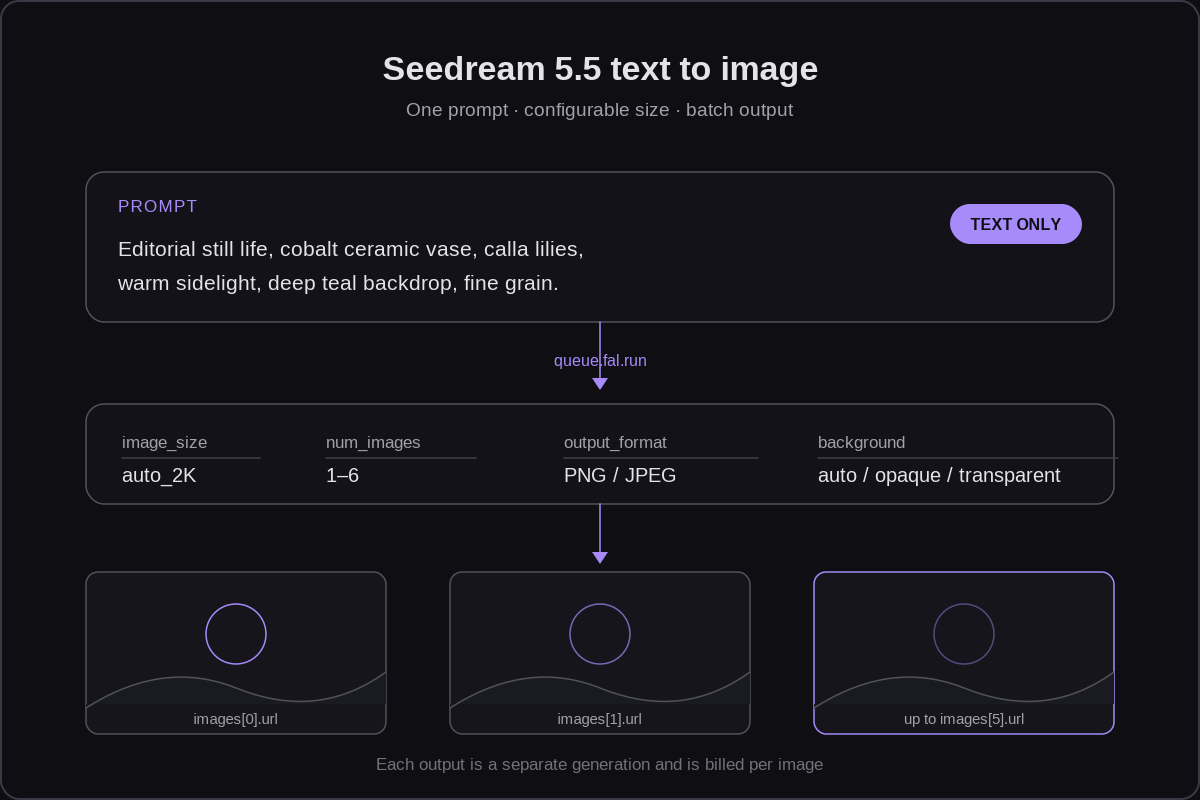
Seedream 5.5 is a ByteDance text-to-image model available through fal's queue API. The Seedream 5.5 text-to-image endpoint accepts a text prompt and returns an array of image URLs. Unlike an image editor, this endpoint does not take an input image: it starts from the prompt and produces separate generations for the number of outputs requested.
A Text-to-Image Endpoint, Not an Editor
The published Seedream 5.5 text-to-image API takes a prompt and optional generation parameters. It returns images only. There is no reference-image field on this endpoint and no edit variant in the same path, so Seedream 5.5 text to image is the supported workflow here.
Batch Output in One Request
num_images controls how many separate Seedream 5.5 generations run from a single prompt. fal allows between one and six outputs per request. Each returned item has its own URL, and pricing is calculated per output image.
Configurable Dimensions and Formats
image_size accepts automatic 1K, 1.5K, and 2K tiers, common aspect-ratio presets, or a width-and-height object. output_format accepts PNG or JPEG. A transparent background returns RGBA and requires PNG, so the generator forces PNG for that option.
Seedream 5.5 Features and Parameters
These settings come from the published Seedream 5.5 API schema and are exposed in the generator above.
Automatic 1K, 1.5K, and 2K Sizes
auto_1K, auto_1.5K, and auto_2K let Seedream 5.5 choose dimensions inside each resolution tier. auto_2K is the endpoint default and carries the higher per-image price.
Common Aspect Ratio Presets
Square, landscape 4:3 and 16:9, and portrait 4:3 and 16:9 presets are available. Custom dimensions must keep total pixels between 921,600 and 4,624,220 and an aspect ratio between 1/16 and 16.
One to Six Images Per Request
num_images creates between one and six independent Seedream 5.5 outputs from one prompt. This is useful for comparing compositions, but every output is billed separately.
PNG and JPEG Output
output_format selects PNG or JPEG. PNG is the default and is required when background is set to transparent, because JPEG cannot store an alpha channel.
Auto, Opaque, or Transparent Background
background can be auto, opaque, or transparent. auto lets the model decide from the prompt and chosen file type; transparent returns an RGBA image.
Transparent PNG for Compositing
A transparent Seedream 5.5 result is suited to cutouts, product assets, and overlay work. The generator keeps output_format on PNG whenever transparent is selected so the API constraint is satisfied.
Published Per-Image Price
fal bills Seedream 5.5 per output image: $0.03 at 1K or 1.5K, and $0.0405 at 2K. Custom dimensions at or below 2,610,000 pixels use the lower rate; larger dimensions use the 2K rate.
Queue-Based Response
The endpoint submits a queue request and returns images through images[].url. A batch of six results arrives as six entries in the images array, all shown in the generator's preview.
Why Use the Seedream 5.5 Text-to-Image Generator
The practical value of Seedream 5.5 is a small set of controls that map directly to production asset work.
Seedream 5.5 Use Cases
Seedream 5.5 text to image fits workflows that start with a written brief and need one or more image outputs.
Marketing Visual Exploration
Describe a campaign scene, set Seedream 5.5 to an aspect ratio that matches the placement, and generate several outputs to compare before a design review.
Product and Transparent Assets
Use a transparent background with PNG output when the Seedream 5.5 image will be composited over a page background or placed into a catalog layout.
Editorial Portrait Concepts
A detailed prompt can establish clothing, lighting, palette, and framing. Seedream 5.5 supports portrait presets for vertical compositions and up to six separate generations.
Concept Boards and Mood Boards
Generate a small Seedream 5.5 batch from one brief, then select the frames that best match the direction. Batch output makes the alternatives available in a single request.
Seedream 5.5 Technical Specifications
The Seedream 5.5 API limits below come from fal's published queue OpenAPI schema and model pricing notes, audited on November 15, 2026.
Endpoint
The Seedream 5.5 API endpoint is bytedance/seedream/v5.5/text-to-image on fal's queue service. The model id is sent as-is, without a fal-ai/ prefix.
Required Input
prompt is the only required field. It is a text string describing the image Seedream 5.5 should generate.
Image Size
image_size defaults to auto_2K. Published enums include square_hd, square, portrait_4_3, portrait_16_9, landscape_4_3, landscape_16_9, auto_1K, auto_1.5K, and auto_2K. A width-and-height object is also accepted.
Dimension Constraints
Custom dimensions must have between 921,600 and 4,624,220 total pixels and an aspect ratio between 1/16 and 16.
Output Count
num_images accepts an integer from 1 to 6 and defaults to 1. The generator exposes each value as a select option.
File Type
output_format accepts png or jpeg and defaults to png. transparent backgrounds require png.
Background
background accepts auto, opaque, or transparent and defaults to auto. auto lets the model choose from the prompt and chosen file type.
Response Shape
A completed Seedream 5.5 request returns a required images array. Each entry contains a url, and may include content_type, file_name, file_size, width, and height.
Pricing
fal bills Seedream 5.5 per output image: $0.03 at 1K or 1.5K, and $0.0405 at 2K. Custom dimensions at or below 2,610,000 pixels use the lower rate; larger dimensions use the 2K rate.
Default Advanced Fields
watermark defaults to false, sync_mode defaults to false, and enable_safety_checker defaults to true. These fields are not exposed by the browser generator.
Frequently Asked Questions About Seedream 5.5
Short answers about the Seedream 5.5 text-to-image endpoint, its pricing, and its limits.
Start Generating with Seedream 5.5
Write a prompt, choose a resolution tier and output count, and generate a Seedream 5.5 batch directly on this page.